POPPUR爱换

标题: 希捷将免费提供缺陷硬盘的修理和数据恢复工作 [打印本页]

作者: h5nc    时间: 2009-1-17 14:20
标题: 希捷将免费提供缺陷硬盘的修理和数据恢复工作
转自 http://www.cnbeta.com/articles/75097.htm


在希捷Barracuda 7200.11硬盘被曝出有缺陷问题后,希捷发布了一个Firmware更新,但直到今天,公司发言人才公布了维修政策.
希捷将免费维修缺陷硬盘产品,同时包恢复硬盘数据,用户需要在网站将硬盘型号,序列号,当前固件版本号进行登记,希捷回复后会引导用户修理工作,并且数据不会丢失,本次维修政策涵盖1.5TB,750GB,640GB, 500GB, 320GB,160GB版本的Barracuda 7200.11硬盘,还有一部分出问题的迈拓和ES.2型号,以下是希捷原文:
Seagate has isolated a potential firmware issue in certain products, including some Barracuda 7200.11 hard drives and related drive families based on this product platform, manufactured through December 2008. In some circumstances, the data on the hard drives may become inaccessible to the user when the host system is powered on*. As part of our commitment to customer satisfaction, we are offering a free firmware upgrade to those with affected products. To determine whether your product is affected, please visit the Seagate Support web site at http://seagate.custkb.com/seagate/crm/selfservice/search.jsp?DocId=207931.
Support is also available through Seagate's call center: 1-800-SEAGATE (1 800 732-4283)
Customers can expedite assistance by sending an email to Seagate (discsupport@seagate.com). Please include the following disk drive information: model number, serial number and current firmware revision. We will respond, promptly, to your email request with appropriate instructions. There is no data loss associated with this issue, and the data still resides on the drive. But if you are unable to access your data due to this issue, Seagate will provide free data recovery services. Seagate will work with you to expedite a remedy to minimize any disruption to you or your business.
For a list of international telephone numbers to Seagate Support and alternative methods of contact, please access http://www.seagate.com/www/en-us/about/contact_us/
*There is no safety issue with these products.

作者: raykidd    时间: 2009-1-17 18:38
还算厚道
作者: zkxyy    时间: 2009-1-17 18:44
会不会再上演艳照门{lol:]
作者: 二代战神    时间: 2009-1-17 18:58
这回是啥个照门
作者: whateveru    时间: 2009-1-17 19:18
我发过了,请加上1TB型号,那个翻译的忘了
作者: roverlala    时间: 2009-1-17 21:34
还能回复数据...看来ST还算厚道...
作者: ahfire    时间: 2009-1-17 23:57
惨,已经确认在须升级列表硬盘中


作者: echocat    时间: 2009-1-17 23:59
还行,不然以为希捷真不想继续做下去了呢
作者: netware    时间: 2009-1-18 01:39
提示: 作者被禁止或删除 内容自动屏蔽
作者: sak2000    时间: 2009-1-18 02:06
我打开http://seagate.custkb.com/seagat ... ch.jsp?DocId=207931
怎么什么也看不到,文章内容没有,试了很多电脑了
作者: bww    时间: 2009-1-18 13:11
惨,已经确认在须升级列表硬盘中


ahfire 发表于 2009-1-17 23:57
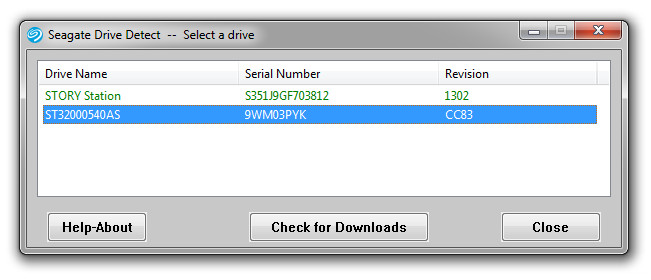

请问,你这个是怎么确认是否在升级列表中啊?
作者: ahfire    时间: 2009-1-18 13:34
本帖最后由 ahfire 于 2009-1-18 13:37 编辑

Welcome, Seagate hard drive owners.  A number of Seagate hard drives from the following families may fail when the host system is powered on:

Barracuda 7200.11
DiamondMax 22
Barracuda ES.2 SATA
SV35

Once a drive has failed, the data is inaccessible to users.  Seagate has isolated this issue to a firmware bug affecting drives from these families manufactured through December 2008.  Please use the following tools and instructions to determine if you have one of the affected products.  If you do, we recommend that you update the firmware on the disk drive.

To help determine if you need to pursue this any further, you will need to check your model number, serial number and firmware revision.  This can be done in Windows – it's easy!  Download and run, or simply run as is, the Seagate Drive Detect software program.  You will see a screen like this.  Look for the drives that are Attached:

In this example above the model number name is ST31500341AS, the serial number 9VS00J20 and firmware revision SD1A.

Click here to download Drive Detect:   

Or you can use Microsoft Windows Device Manager to see the model numbers of you disk drive.  At the Windows Start button select Run and type:  devmgmt.msc  

Then expand the Disk Drive branch to see the model numbers.  Like this:


Or you can download SeaTools for Windows which displays all of the needed information.

See if your model number is in this list.

Barracuda 7200.11
ST31000340AS
ST31000640AS
ST3750330AS
ST3750630AS
ST3640330AS
ST3640630AS
ST3500320AS
ST3500620AS
ST3500820AS
ST31500341AS
ST31000333AS
ST3640323AS
ST3640623AS
ST3320613AS
ST3320813AS
ST3160813AS
Barracuda ES.2 SATA
ST31000340NS
ST3750330NS
ST3500320NS
ST3250310NS
DiamondMax 22
STM31000340AS
STM31000640AS
STM3750330AS
STM3750630AS
STM3500320AS
STM3500620AS
STM3500820AS
STM31000334AS
STM3320614AS
STM3160813AS

If you have one of the models listed above, Customers can expedite assistance by contacting Seagate via email. Please include the following disk drive information: model number, serial number and current firmware revision.  We will respond, promptly, to your email request with appropriate instructions.

Or you can call Seagate Support at 1-800-SEAGATE.  Please be prepared to give the serial number of your drive as the solution depends on knowing the exact serial number.

For a list of international telephone numbers to Seagate Support and alternative methods of contact, please access http://www.seagate.com/www/en-us/about/contact_us/
作者: bww    时间: 2009-1-18 13:53
谢谢楼上的,能上传那个工具吗?或提供一下下载地址!
作者: sheenpc    时间: 2009-1-18 14:11
具体地址是哪里啊,都是英文的,最好有好心人能帮忙翻译一下!
作者: ahfire    时间: 2009-1-18 14:20
我不准备刷固件了,准备换盘

工具地址在下边
http://support.seagate.com/kbimg/utils/drivedetect.exe
作者: bww    时间: 2009-1-18 14:28
惨,已经确认在须升级列表硬盘中


ahfire 发表于 2009-1-17 23:57


楼上误会了吧,这个工具只是检测已经在系统中存在的ST系列硬盘,并不是有问题的硬盘列表哦!
我的7200.10、MAXTOR 80G都可以检测得到的!
作者: bww    时间: 2009-1-18 14:37
那一大堆英语,好像是说2008年12月生产的部分型号硬盘可能有问题,但是你的硬盘是否有问题,还需要向ST咨询一下。并提供了联系方法、型号列表等。

不知道是否理解的正确。
作者: ahfire    时间: 2009-1-18 18:20
See if your model number is in this list.

Barracuda 7200.11
ST31000340AS
ST31000640AS
ST3750330AS
ST3750630AS
ST3640330AS
ST3640630AS
ST3500320AS
ST3500620AS
ST3500820AS
ST31500341AS
ST31000333AS
ST3640323AS
ST3640623AS
ST3320613AS
ST3320813AS
ST3160813AS
Barracuda ES.2 SATA
ST31000340NS
ST3750330NS
ST3500320NS
ST3250310NS
DiamondMax 22
STM31000340AS
STM31000640AS
STM3750330AS
STM3750630AS
STM3500320AS
STM3500620AS
STM3500820AS
STM31000334AS
STM3320614AS
STM3160813AS
作者: wujiwu    时间: 2009-1-18 18:30
发布固件吧。
我有点心寒
作者: amon    时间: 2009-1-18 18:46
总算是有个说法了
作者: bww    时间: 2009-1-18 19:06
See if your model number is in this list.

Barracuda 7200.11
ST31000340AS
ST31000640AS
ST3750330AS
ST3750630AS
ST3640330AS
ST3640630AS
ST3500320AS
ST3500620AS
ST3500820AS
ST31500341AS
ST3 ...
ahfire 发表于 2009-1-18 18:20


这些是硬盘型号,但是并不是说都有问题,还有固件版本、批次(序列号)等判断条件
作者: strollman    时间: 2009-1-18 20:18
那怎么判断是否要升级固件呀。有知道的兄弟说一下了。用那个软件测试我的硬盘也在这型号表里面。
可到那下固件。怎么升呀。请指点一下了。
作者: flyxxt    时间: 2009-1-18 21:04
升级固件我也不放心,找机会换7400.12算了
作者: majjjj    时间: 2009-1-18 21:40
有2块ST3320613AS
怎么操作看是否需要修复啊?
作者: shaog    时间: 2009-1-18 21:43
yun,ST3500320NS
作者: 凤凰天驱    时间: 2009-1-18 21:47
提示: 作者被禁止或删除 内容自动屏蔽
作者: bww    时间: 2009-1-18 23:13
这个里面看看
http://we.pcinlife.com/thread-1081506-1-1.html
作者: hexplorer    时间: 2009-1-19 08:18
在那个列表里一定有问题,不在未必没问题。
我的1T就不在,低温可能不认硬盘。。。
作者: yooyea    时间: 2009-1-19 09:08
Model: ST3500320AS,
作者: gzfan    时间: 2009-1-19 09:33
关注一下啊,我的硬盘也在这个列表中啊
作者: flyxxt    时间: 2009-1-19 09:36
在那个列表里一定有问题,不在未必没问题。
我的1T就不在,低温可能不认硬盘。。。
hexplorer 发表于 2009-1-19 08:18


确实,低温问题希捷压根没提及
作者: liubangde    时间: 2009-1-19 09:53
升级固件就是把缓存禁用了,性能降低不少
作者: Radmin25    时间: 2009-1-19 11:31
在用7200 10没用过7200 11
作者: mandrake    时间: 2009-1-19 17:02
貌似这次问题挺严重。。
作者: etzhaowx    时间: 2009-1-19 20:37
回家赶快去看看俺的320G在不在范围之内
作者: bww    时间: 2009-1-19 21:16
升级是禁用缓存?这次不是读写挂起问题,而是突然检测不到盘的问题,和缓存有关系吗?


欢迎光临 POPPUR爱换 (https://we.poppur.com/) Powered by Discuz! X3.4