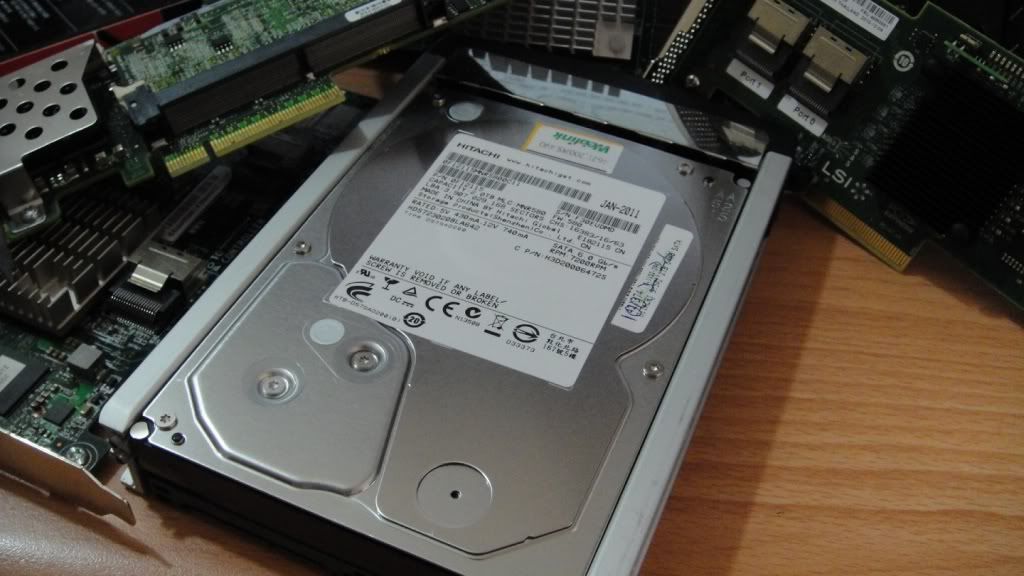
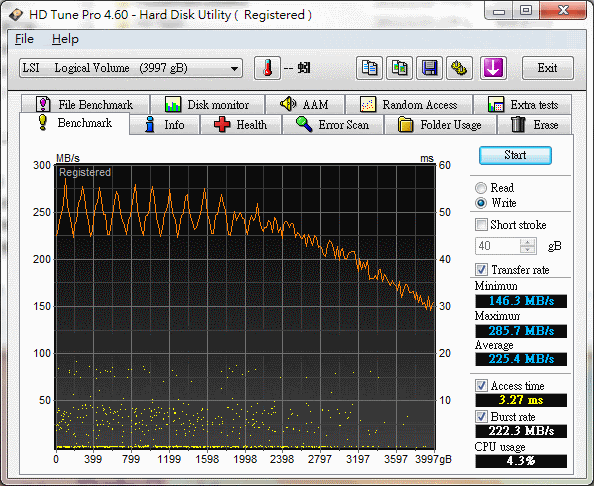
大概由於某些原因, 買了兩顆來用. 結果最後還是沒有任何作用. 只好作罷, 這邊剛好來測試好了, 測完再便宜清掉.
7K3000是目前Hitachi新款的SATA 3.0 HDD, 在相關測試上顯示他的成績不錯. 我拿了兩顆進行測試, 他的循序性能相當好, 適合作為倉庫用途使用.
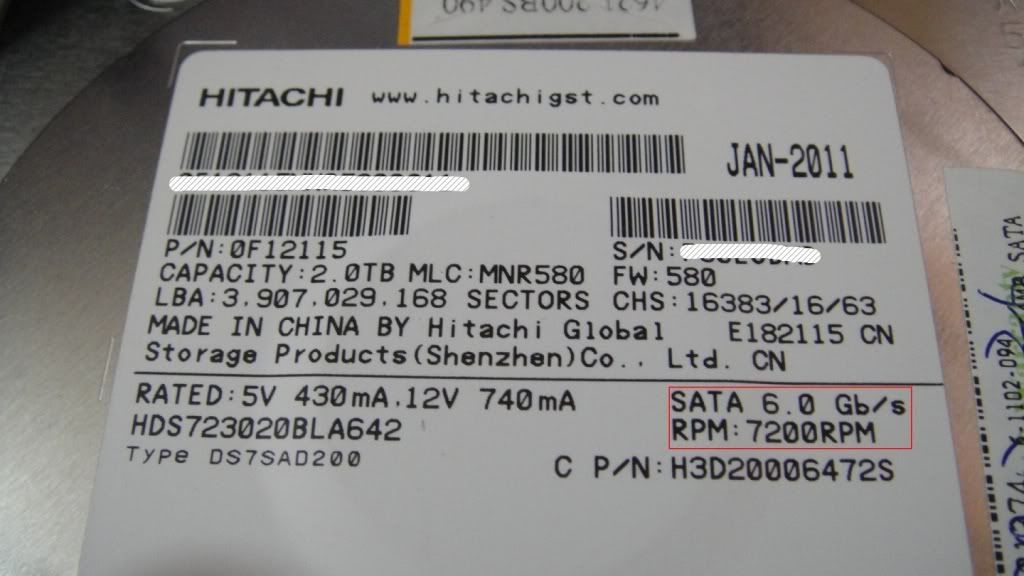
近看貼紙部分訊息顯示:
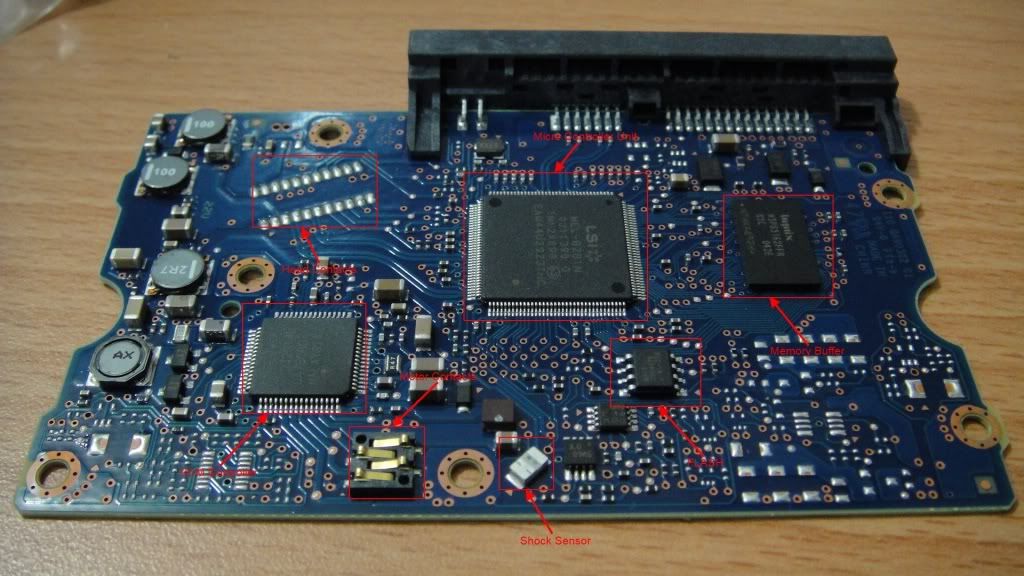
可以看到支持了6Gb/s規格, 以及72000RPM轉速. 下面是他的PCB電路部分.
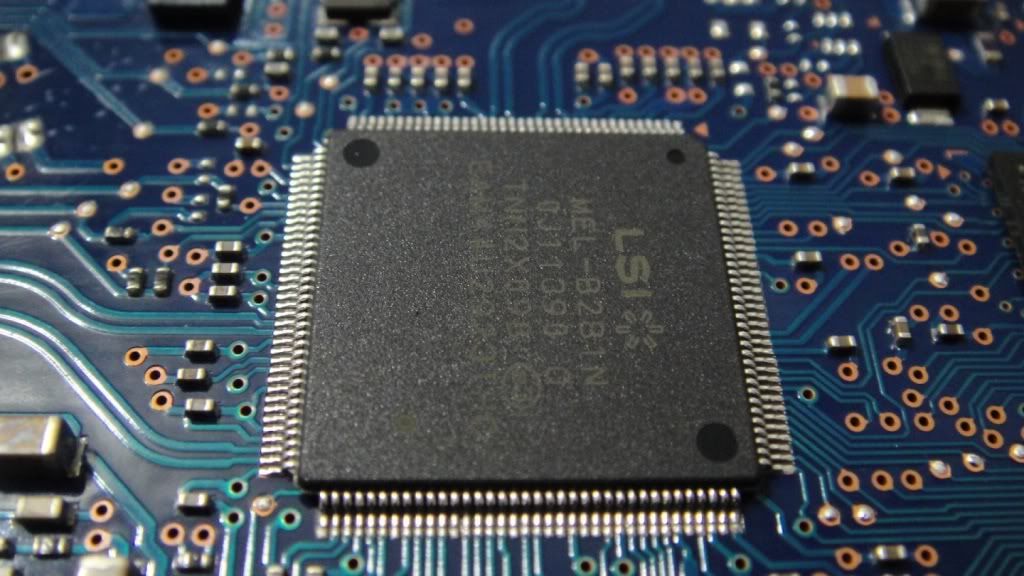
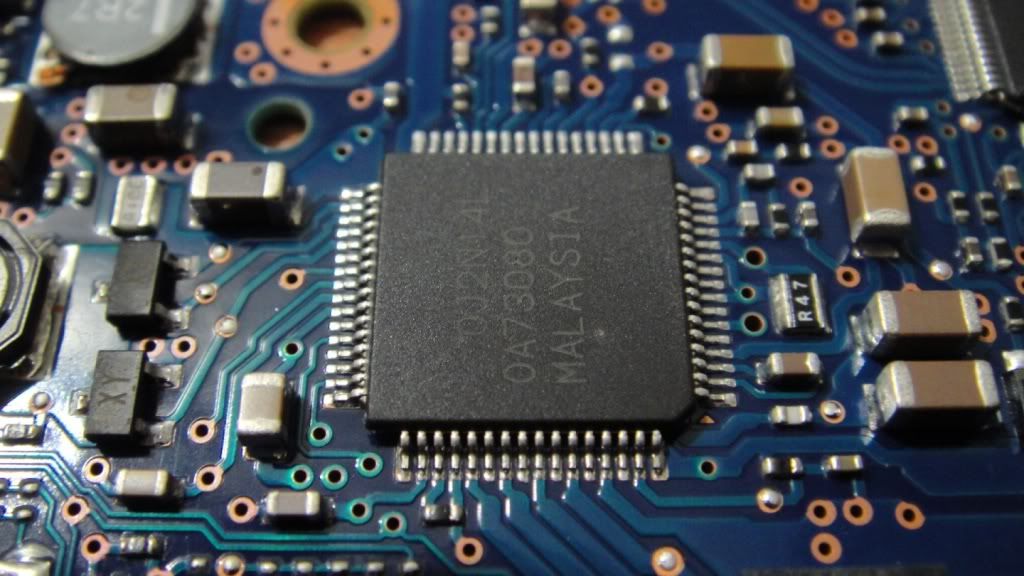
硬碟PCB部分基本的幾個特徵. 主要MCU使用了LSI控制器. 詳細規格無從查起.
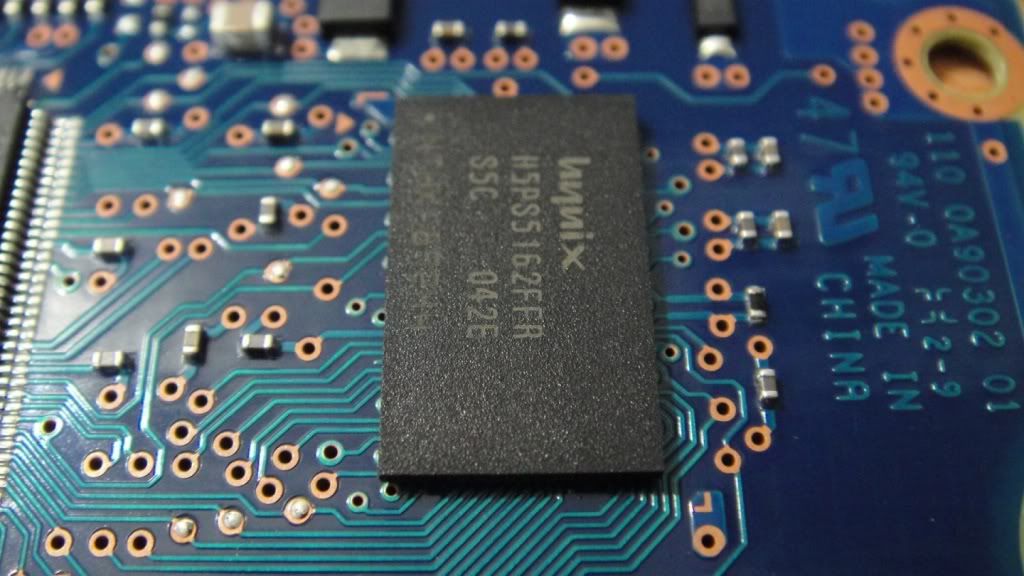
Memory Buffer則是使用海力士的512Mbits(64MB)顆粒. 型號為H5PS5162FFTR, S5C. 查詢相關文件後, 這應該是一顆DDR2-800的記憶體顆粒. 主要負責控制器微碼載入以及資料緩衝.
這顆應該是VCM控制器, 主要控制馬達及磁頭操作.
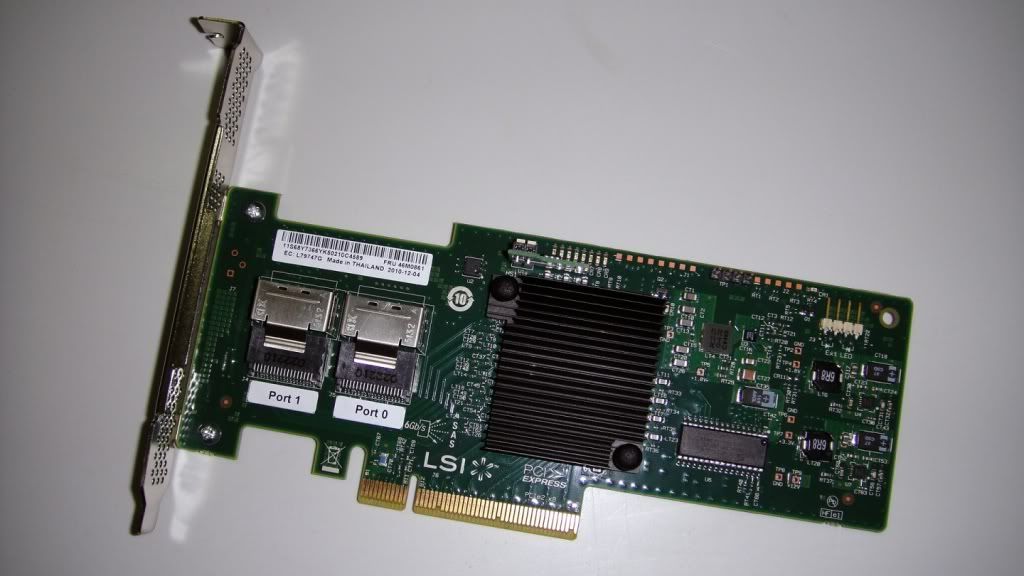
其他部分不再提起. 為了要能夠測試6Gb/s性能, 這裡採用了一張LSI 6Gb/s IR/IT HBA, 使用LSISAS2008控制晶片. LSISAS2008是目前LSI作為Entry-line提供HBA以及ROMB方案使用. IR/IT為LSI提供的一種firmware架構, 使用Fusion-MPT的RAID stack為整個基本結構. 在IR/IT模式下, 根據不同的切換方式, IT模式為native mode, 可以使OS直接識別SATA/SAS儲存裝置. IR模式提供基礎的RAID功能和性能. 對於LSISAS2008來說, 內置了一顆PPC440 IOP, 不過這不是取決於Hardware RAID的特徵, 對於LSI而言:
RAID on chip (ROC) processor for hardware RAID. The software RAID controller you are using do not have ROC chips.
Software RAID controllers utilize the system processor to process I/O because they do not utilize ROC chips.
The ROC chip allows all processing to be offset to the RAID controller, not the system processor. Firmware handles striping, consistency checks, I/O, rebuild, recovery.
沒錯, LSISAS2008是一個Software RAID架構, 不管IR/IT也好, 或著IMR模式下, No RAID Assist, Not Hardware RAID. PPC440@533MHz的processor core的作用不明, 只能說他可能是LSI的RAID stack架構下可能會產生的副作用吧.
LSISAS2008內置了2MB buffer, 稱之為Context Memory, 作為firmware操作內部使用. 關於這個SRAM buffer詢得了兩種回應. LSI=> The I/O processor processes I/O. You need a This is used for processes internal to the chip and not for read or write cache. Intel=> Context memory is like processor cache memory. The LSISAS2008 doesn’t support “external” cache memory so it’s embedded in the ROC/Controller to provide a place for calculations and temporary data storage. Because it’s embedded there isn’t space for much memory (2MB).
Context Memory不作為任何cache使用, 它的存取由firmware來決定.
不同的firmware模式下提供的功能也不盡相同. IR/IT和IMR兩種模式決定不同的應用. LSISAS2008提供這兩種模式.
The design, firmware stack, driver family, and every aspect of these boards is completely different. They are in no way similar, with the exception that there are not hardware RAID.
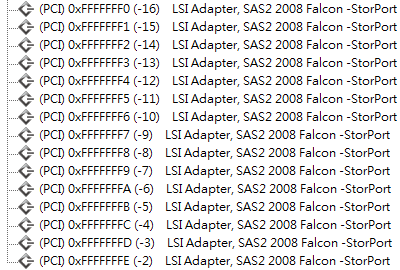
IMR使用WebBIOS, 功能與特性遠比基礎的Fusion-MPT BIOS豐富許多, 設限也比較少. 不過在IR/IT模式下, LSISAS2008的Host Bus面向PCIe 2.0, 支持MSI-X, 提供大量的IRO資源操作, 對於CMP/SMP系統架構來說, I/O負載有正面上的助益.
從上圖看到, LSISAS2008提供了大量IRQ資源, 可供大量儲存裝置操作使用, 不過我這邊使用兩顆HDD測試而已, 沒甚麼影響.
這是一張OEM的LSISAS2008 RAID HBA, 不過他是提供IMR的firmware模式, 由於他的FLASH容量比IR/IT模式產品大很多, 有128Mbits之多, IR/IT只有32Mbits. 我胡亂猜測可能放了某種程度的RAID算法, 因為LSISAS2108 RoC產品的FLASH也才64Mbits容量. 加上Fusion-MPT架構的Device Driver是屬於輕型結構. 在容量較大的FLASH下, 小弟我動了一些非法的手腳把IMR硬刷為IR/IT模式, 這樣的好處就是方便測試單顆SAS/SATA HDD, 因為IMR模式下, OS是無法直接識別儲存裝置的.
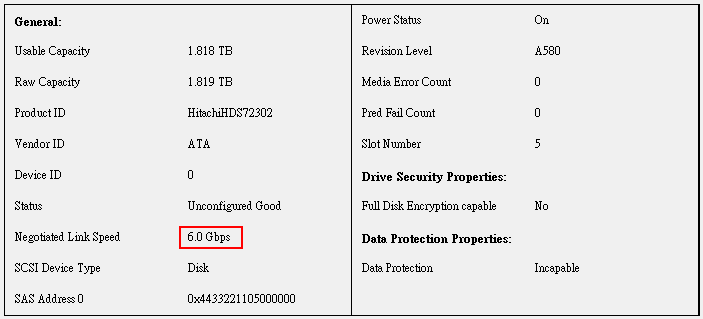
將7K3000裝上去後, 透過LSI GUI工具-MSM明確認定了當前操作的Link Speed為6Gb/s.
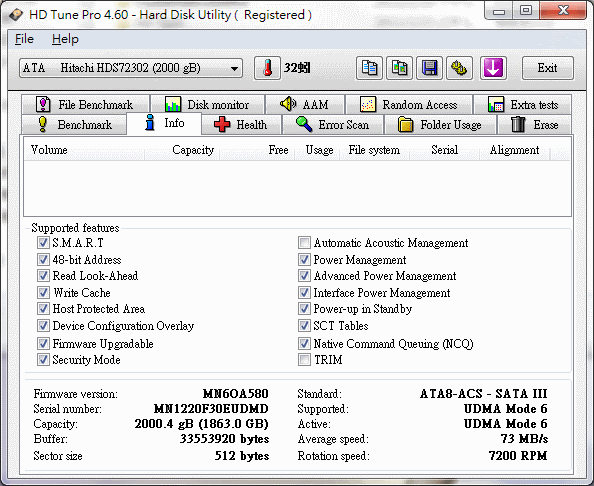
使用HD Tune取得了相關資訊, 不過有些顯示不太正確.
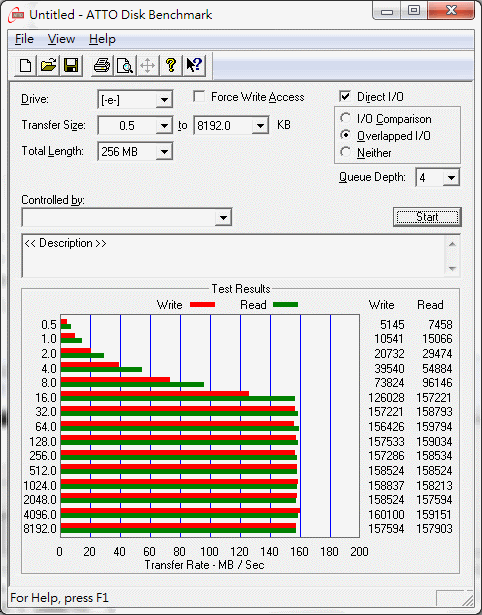
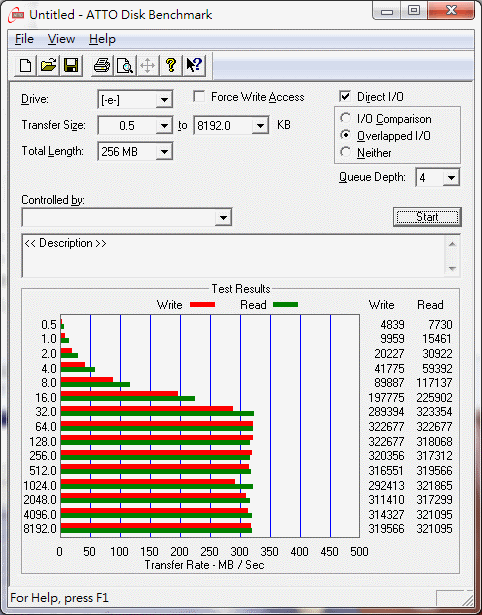
接下來就開始進行檢測了, 首先為了取得最大的循序I/O性能, 先使用ATTO Benchmark來測試. 下面為QD4的情況下:
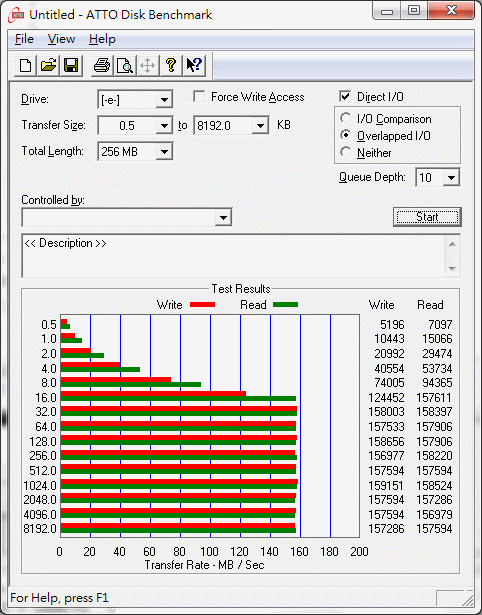
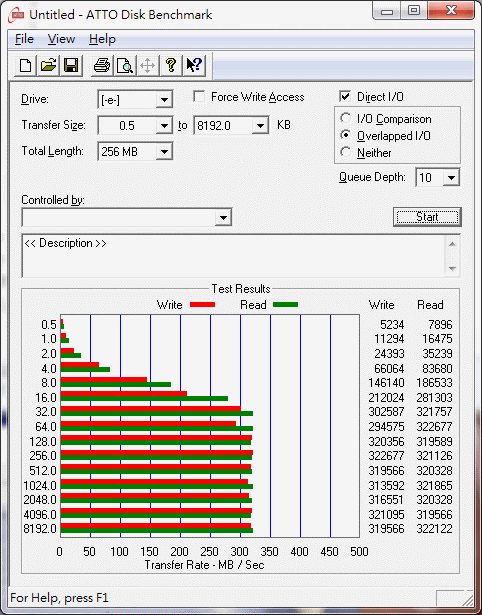
在QD4的情況下, 循序I/O達到了將近160MB, 以目前來說是相當優秀. 接下來是QD10的部分, 沒太多改變.
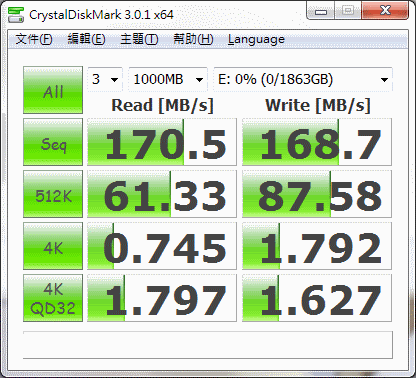
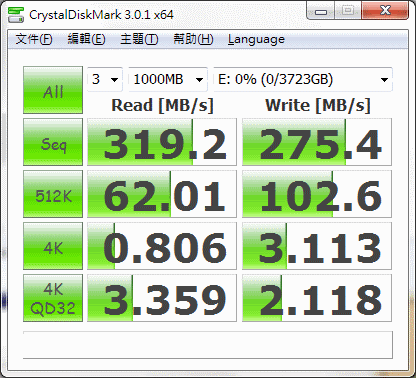
在過來使用Crystal Disk Mark來檢測不同的I/O應用成績, 主要還是看循序操作下的I/O性能. 測試檔案尺寸為1000MB.
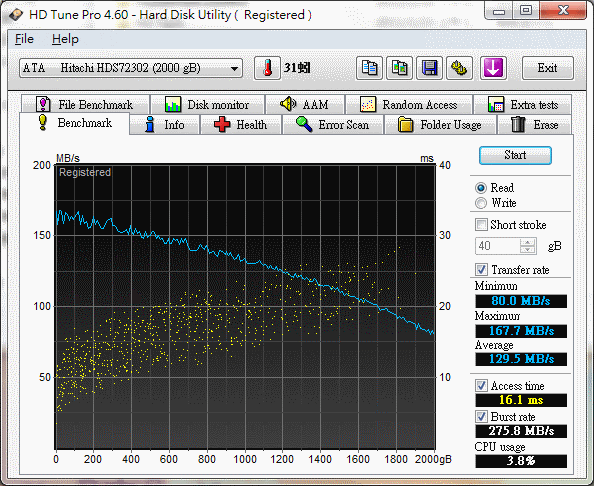
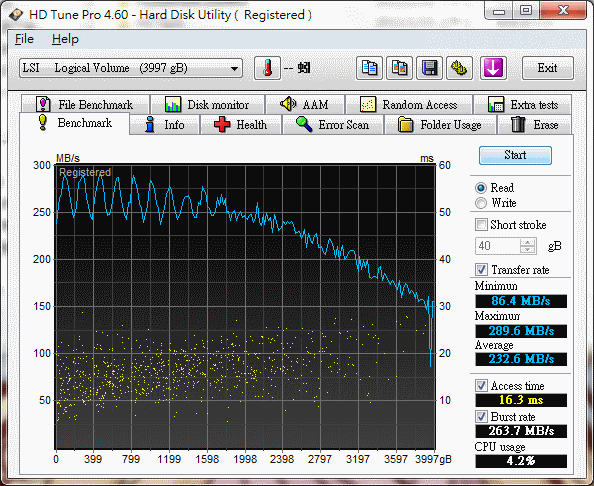
不管是讀取或是寫入, 都達到良好的性能. 極適合作為大型檔案資料存放, 倉庫硬碟之用途. HD Tune是最被常拿來使用的檢測軟體:
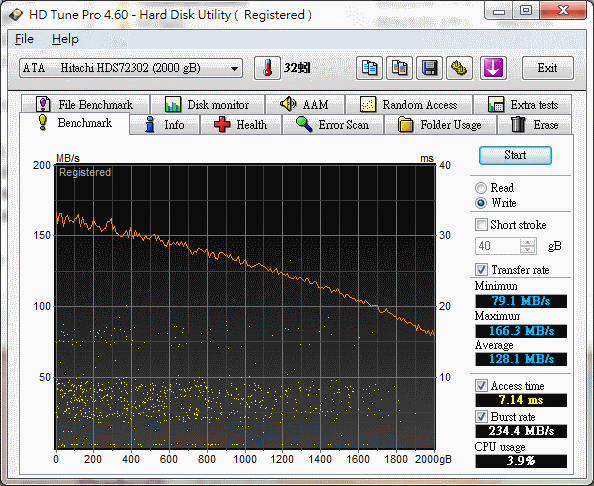
可以看到一個情況就是7K3000的Access Time較高. 平均讀取取得了129MB的良好成績. 而寫入情況則是如下:
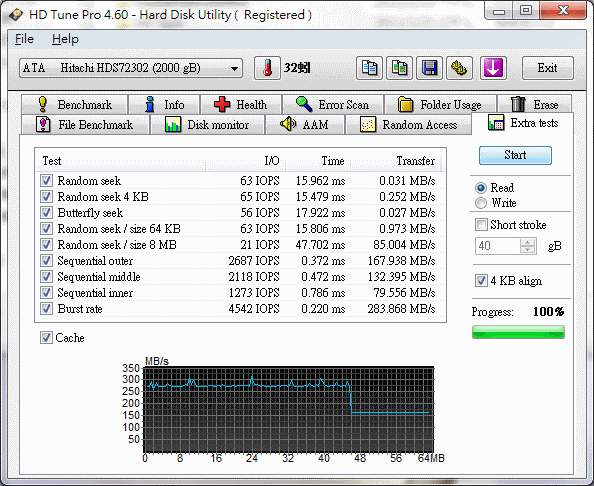
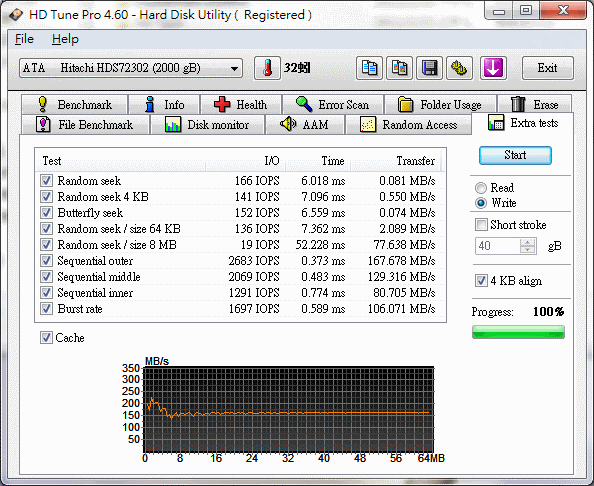
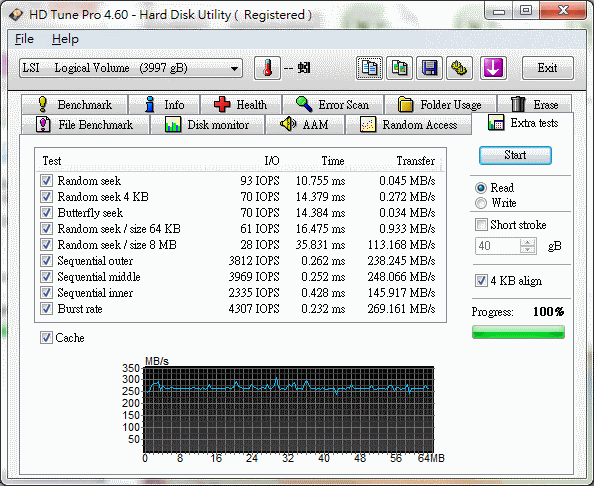
寫入成績不差. 其餘的extra部分就隨意看看吧. 讀取情況下:
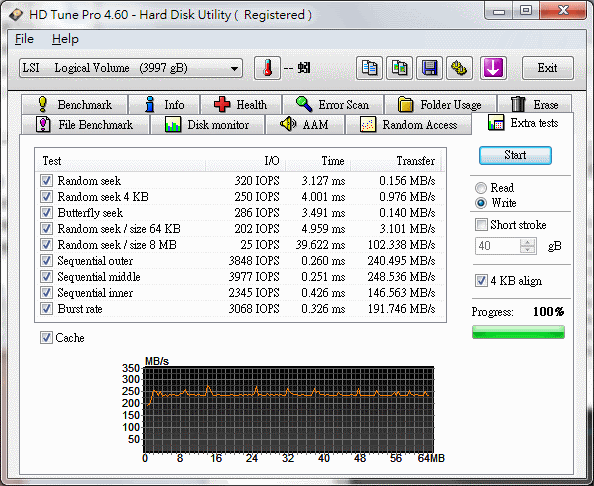
寫入情況下:
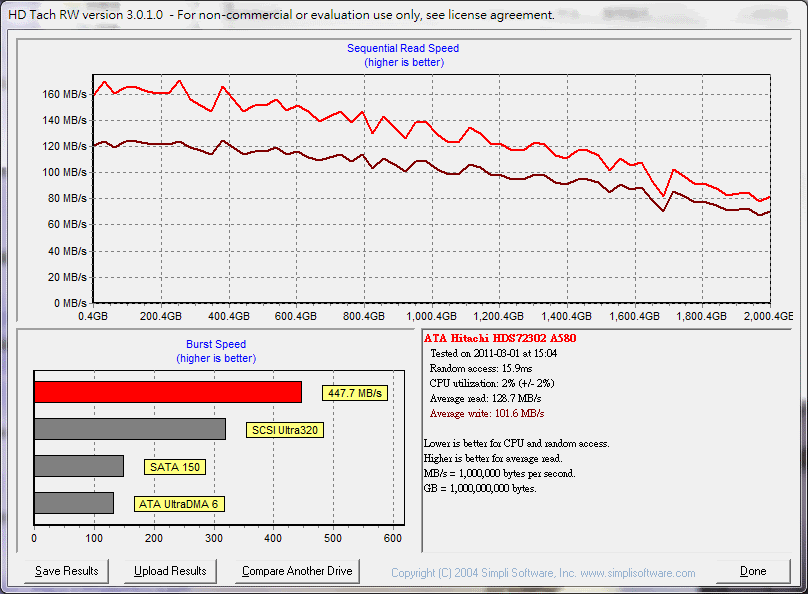
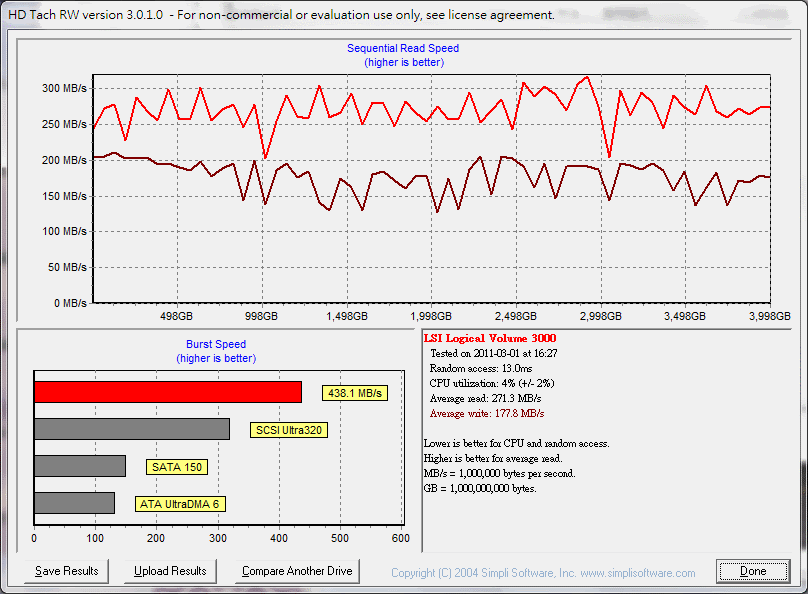
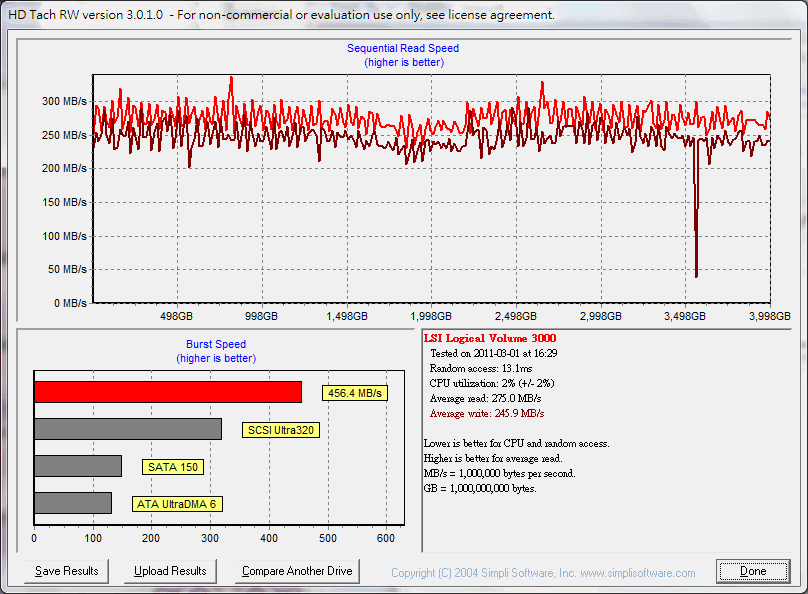
另外使用HD Tach來檢測循序I/O性能, 8MB尺寸測試:
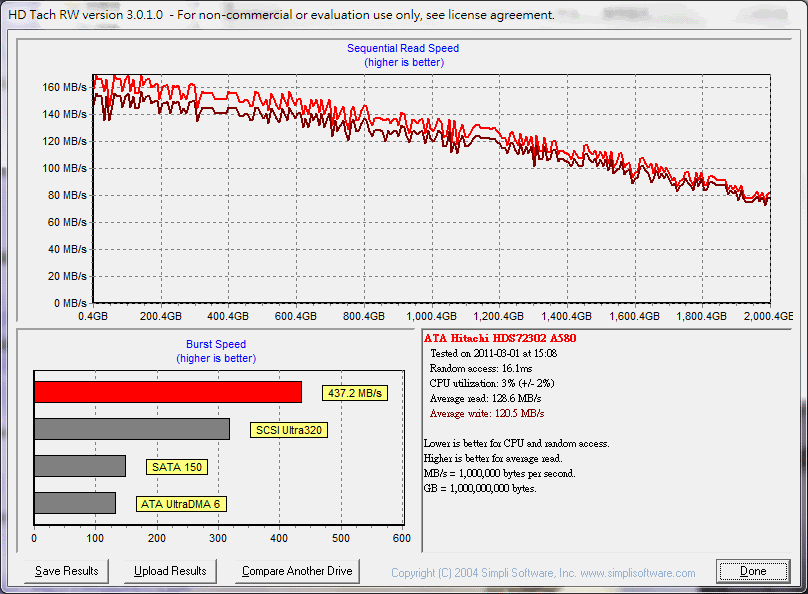
Ok, 算是達到預期成績. 在密集的32MB測試下, 取得良好的效能:
ioMeter是作為儲存裝置測試下, 提供較嚴苛的指標級測試, 我這部分有做循序I/O下的最大性能測試, 從QD1到QD256, 但是由於最近遭遇悲慘的情況. 小弟也就懶得再製圖了. 各位打開連結看看就好.
最大I/O讀取性能: http://www.osslab.org.tw/@api/de ... _read_qd1_qd256.csv
最大I/O寫入性能: http://www.osslab.org.tw/@api/de ... write_qd1_qd256.csv
这款软件很不错,测试完了还生成个报告文件作者: per1-q1222 时间: 2011-3-2 11:40
C:\Program Files (x86)\smartmontools\bin>smartctl --scan /dev/sdi -d ata [ATA]
------------------------------------------------------------------------------------------------------C:\Program Files (x86)\smartmontools\bin>smartctl -a /dev/sdi
smartctl 5.40 2010-10-16 r3189 [i686-w64-mingw32-2008r2(64)] (sf-win32-5.40-1)
Copyright (C) 2002-10 by Bruce Allen, http://smartmontools.sourceforge.net
=== START OF INFORMATION SECTION ===
Device Model: Hitachi HDS723020BLA642
Serial Number: MN1220F30GYSED
Firmware Version: MN6OA580
User Capacity: 2,000,398,934,016 bytes
Device is: Not in smartctl database [for details use: -P showall]
ATA Version is: 8
ATA Standard is: ATA-8-ACS revision 4
Local Time is: Wed Mar 02 11:36:18 2011 TST
SMART support is: Available - device has SMART capability.
SMART support is: Enabled
=== START OF READ SMART DATA SECTION ===
SMART overall-health self-assessment test result: PASSED
General SMART Values:
Offline data collection status: (0x84) Offline data collection activity
was suspended by an interrupting command
from host.
Auto Offline Data Collection: Enabled.
Self-test execution status: ( 0) The previous self-test routine completed
without error or no self-test has ever
been run.
Total time to complete Offline
data collection: (18950) seconds.
Offline data collection
capabilities: (0x5b) SMART execute Offline immediate.
Auto Offline data collection on/off supp
ort.
Suspend Offline collection upon new
command.
Offline surface scan supported.
Self-test supported.
No Conveyance Self-test supported.
Selective Self-test supported.
SMART capabilities: (0x0003) Saves SMART data before entering
power-saving mode.
Supports SMART auto save timer.
Error logging capability: (0x01) Error logging supported.
General Purpose Logging supported.
Short self-test routine
recommended polling time: ( 1) minutes.
Extended self-test routine
recommended polling time: ( 255) minutes.
SCT capabilities: (0x003d) SCT Status supported.
SCT Error Recovery Control supported.
SCT Feature Control supported.
SCT Data Table supported.
------------------------------------------------------------------------------------------------------
C:\Program Files (x86)\smartmontools\bin>smartctl -l scterc /dev/sdi smartctl 5.40 2010-10-16 r3189 [i686-w64-mingw32-2008r2(64)] (sf-win32-5.40-1)
Copyright (C) 2002-10 by Bruce Allen, http://smartmontools.sourceforge.net
SCT Error Recovery Control:
Read: Disabled
Write: Disabled
------------------------------------------------------------------------------------------------------
C:\Program Files (x86)\smartmontools\bin>smartctl -l scterc,70,70 /dev/sdi smartctl 5.40 2010-10-16 r3189 [i686-w64-mingw32-2008r2(64)] (sf-win32-5.40-1)
Copyright (C) 2002-10 by Bruce Allen, http://smartmontools.sourceforge.net
SCT Error Recovery Control:
Read: 70 (7.0 seconds)
Write: 70 (7.0 seconds)
------------------------------------------------------------------------------------------------------
C:\Program Files (x86)\smartmontools\bin>smartctl -l scterc /dev/sdi
smartctl 5.40 2010-10-16 r3189 [i686-w64-mingw32-2008r2(64)] (sf-win32-5.40-1)
Copyright (C) 2002-10 by Bruce Allen, http://smartmontools.sourceforge.net
SCT Error Recovery Control: Read: 70 (7.0 seconds)
Write: 70 (7.0 seconds)
------------------------------------------------------------------------------------------------------