POPPUR爱换

标题: Xbox 720 GPU细节曝光 [打印本页]

作者: BDFMK2    时间: 2013-2-5 12:26
标题: Xbox 720 GPU细节曝光


作者: BDFMK2    时间: 2013-2-5 12:26
Last week, we published a poll and you chose to know more about the Durango GPU. Wishes come true. We have splitted the article in three pages, don’t forget to read the whole work.
A better view of Durango’s GPU capabilities and performance.
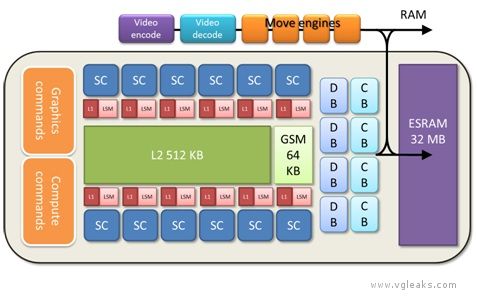
Durango brings the enhanced capabilities of a modern Direct3D 11 GPU to the console space. The Durango GPU is a departure from previous console generations both in raw performance and in structure.
The following table describes expected performance of the Durango GPU. Bear in mind that the table is based only on hardware specifications, not on actual hardware running actual code. For many reasons, theoretical peak performance can be difficult or impossible to achieve with real-world processing loads.
Stat
Value

Clock rate
800 MHz

Compute

Shader cores
12

Instruction issue rate
12 SCs * 4 SIMDs * 16 threads/clock = 768 ops/clock

FLOPs
768 ops/clock * (1 mul + 1 add) * 800 MHz = 1.2 TFLOPS

Interpolation
( 768 ops/clock / 2 ops ) * 800 MHz = 307.2 Gfloat/sec

Geometry

Triangle rate
2 tri/clock * 800 MHz = 1.6 Gtri/sec

Vertex rate
2 vert/clock * 800 MHz = 1.6 Gvert/sec

Vertex/buffer fetch rate (4 bytes)
4 elements/clock * 12 SCs * 800 MHz = 38.4 Gelement/sec

Vertex/Buffer data rate from cache
38.4 Gelements/sec * 4 bytes = 153.6 GB/sec

Memory

Peak throughput from main RAM
68 GB/sec

Peak throughput from ESRAM
128 bytes/clock * 800 MHz = 102.4 GB/sec

ESRAM size
32 MB

GSM size
64 KB

LSM size
12 SCs * 64 KB = 768 KB

L2 cache size
4 x 128 KB = 512 KB (shared)

Texture

Bilinear fetch rate (4 bytes)
4 fetches/clock * 12 SCs * 800 MHz = 38.4 Gtexels/sec

Bilinear data rate from cache
38.4 Gtexels/sec * 4 bytes = 153.6 GB/sec

L1 cache size
16 KB/SC * 12 SCs = 192 KB (nonshared)

Output

Color/depth blocks
4

Pixel clear rate
1 8×8 tile/clock * 4 DBs * 800 MHz = 204.8 Gpixel/sec

Pixel hierarchical Z cull rate
1 8×8 tile/clock * 4 DBs * 800 MHz = 204.8 Gpixel/sec

Sample Z cull rate
16 /clock * 4 DBs * 800 MHz = 51.2 Gsample/sec

Pixel emit rate
4 /clock * 4 DBs * 800 MHz = 12.8 Gpixel/sec

Pixel resolve rate
4 /clock * 4 DBs * 800 MHz = 12.8 Gpixel/sec


作者: BDFMK2    时间: 2013-2-5 12:27
Virtual AddressingAll GPU memory accesses on Durango use virtual addresses, and therefore pass through a translation table before being resolved to physical addresses. This layer of indirection solves the problem of resource memory fragmentation in hardware—a single resource can now occupy several noncontiguous pages of physical memory without penalty.
Virtual addresses can target pages in main RAM or ESRAM, or can be unmapped. Shader reads and writes to unmapped pages return well-defined results, including optional error codes, rather than crashing the GPU. This facility is important for support of tiled resources, which are only partially resident in physical memory
ESRAMDurango has no video memory (VRAM) in the traditional sense, but the GPU does contain 32 MB of fast embedded SRAM (ESRAM). ESRAM on Durango is free from many of the restrictions that affect EDRAM on Xbox 360. Durango supports the following scenarios:

The difference in throughput between ESRAM and main RAM is moderate: 102.4 GB/sec versus 68 GB/sec. The advantages of ESRAM are lower latency and lack of contention from other memory clients—for instance the CPU, I/O, and display output. Low latency is particularly important for sustaining peak performance of the color blocks (CBs) and depth blocks (DBs).
Local Shared Memory and Global Shared MemoryEach shader core of the Durango GPU contains a 64-KB buffer of local shared memory (LSM). The LSM supplies scratch space for compute shader threadgroups. The LSM is also used implicitly for various purposes. The shader compiler can choose to allocate temporary arrays there, spill data from registers, or cache data that arrives from external memory. The LSM facilitates passing data from one pipeline stage to another (interpolants, patch control points, tessellation factors, stream out, etc.). In some cases, this usage implies that successive pipeline stages are restricted to run on the same SC.
The GPU also contains a single 64-KB buffer of global shared memory (GSM). The GSM contains temporary data referenced by an entire draw call. It is also used implicitly to enforce synchronization barriers, and to properly order accesses to Direct3D 11 append and consume buffers. The GSM is capable of acting as a destination for shader export, so the driver can choose to locate small render targets there for efficiency.
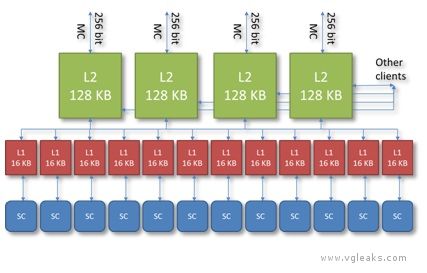
CacheDurango has a two stage caching system, depicted below.

L2 CacheThe GPU contains four separate 8-way L2 caches of 128 KB, each composed of 2048 64-byte cache lines. Each L2 cache owns a certain subset of address space. Texture tiling patterns are chosen to ensure all four caches are equally utilized. The L2 generally acts as a write-back cache—when the GPU modifies data in a cache line, the modifications are not written back to main memory until the cache line is evicted. The L2 cache mediates virtually all memory access across the entire chip, and supplies a variety of types of data, including shader code, constants, textures, vertices, etc., coming either from main RAM or from ESRAM. Shader atomic operations are implemented in the L2 cache.
L1 CacheEach shader core has a local 64-way L1 cache of 16 KB, composed of 256 64-byte cache lines. The L1 generally acts as a write-through cache—when the SC modifies data in the cache, the modifications are pushed back to L2 without waiting until the cache line is evicted. The L1 cache is used exclusively for data read and written by shaders and is dedicated to coalescing memory requests over the lifetime of a single vector. Even this limited sort of caching is important, since memory accesses tend to be very spatially coherent, both within one thread and across neighboring threads.
The L1 cache guarantees consistent ordering per thread: A write followed by a read from the same address, for example, will give the updated value. The L1 cache does not, however, ensure consistency across threads or across vectors. Such requirements must be enforced explicitly—using barriers in the shader for example. Data is not shared between L1 caches or between SCs except via write-back to the L2 cache.
Unlike some earlier GPUs (including the Xbox 360 GPU), Durango leaves texture and buffer data in native compressed form in the L2 and L1 caches. Compressed data implies a longer fetch pipeline—every L1 cache must now have decoder hardware in it that repeats the same calculation each time the same data is fetched. On the other hand, by keeping data compressed longer, the GPU limits cache footprint and intermediate bandwidth. Following the same principle, sRGB textures are left in gamma space in the cache, and, therefore, have the same footprint as linear textures.
To see how this policy affects cache efficiency, consider an sRGB BC1 texture—perhaps the most commonly encountered texture type in games. BC1 is a 4-bit per texel format; on Durango, this texture occupies 4 bits per texel in the L1 cache. On Xbox 360, the same texture is decompressed and gamma corrected before it reaches the cache, and therefore occupies 8 bytes per texel, or 16 times the Durango footprint. For this reason, the Durango L1 cache behaves like a much larger cache when compared against previous architectures.
Just as SCs can hide fetch latency by switching to other vectors, L1 texture caches on Durango are capable of hiding L2 cache latency by continuing to process fetch instructions after a miss. In other words, when a cache miss is followed by one or more cache hits, the hits can be satisfied during the stall for the miss.
FetchDurango supports two types of fetch operation—image fetches and buffer fetches. Image fetches correspond to theSample method in high-level shader language (HLSL) and require both a texture register and a sampler register. Features such as filtering, wrapping, mipmapping, gamma correction, and block compression require image fetches. Buffer fetches correspond to the Load method in HLSL and require only a texture register, without a sampler register. Examples of buffer fetches are:

Image fetches and buffer fetches have different performance characteristics. Image fetches are generally bound by the speed of the texture pipeline and operate at a peak rate of four texels per clock. Buffer fetches are generally bound by the write bandwidth into the destination registers and operate at a peak rate of 16 GPRs per clock. In the typical case of an 8-bit four-channel texture, these two rates are identical. In other cases, such as a 32-bit one-channel texture, buffer fetch can be up to four times faster.
Many factors can reduce effective fetch rate. For instance, trilinear filtering, anisotropic filtering, and fetches from volume maps all translate internally to iterations over multiple bilinear fetches. Bilinear filtering of data formats wider than 32-bits per texel also operates at a reduced rate. Floating point formats that have more than three channels operate at half rate. Use of per-pixel gradients causes fetches to operate at quarter rate.
By contrast, fetches from sRGB textures are full rate. Gamma conversion internally uses a modified 7e4 floating-point representation. This format is large enough to be bitwise exact according to the DirectX 10 spec, yet still small enough to fit through a single filtering pipe.
The Durango GPU supports all standard Direct3D 11 DXGI formats, as well as some custom formats.
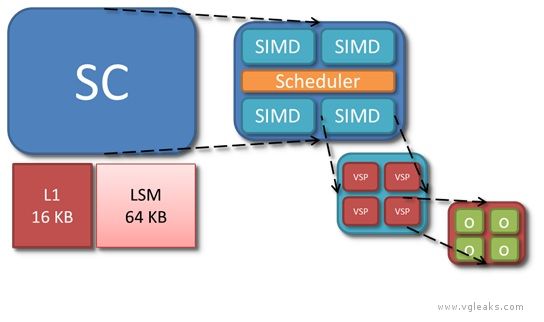
ComputeEach of the 12 Durango SCs has its own L1 cache, LSM (Local Shared Memory), and scheduler, and four SIMD units. O represents a single thread of the currently executing shader.

SIMDEach of the four SIMDs in the shader core is a vector processor in the sense of operating on vectors of threads. A SIMD executes a vector instruction on 64 threads at once in lockstep. Per thread, however, the SIMDs are scalar processors, in the sense of using float operands rather than float4 operands. Because the instruction set is scalar in this sense, shaders no longer waste processing power when they operate on fewer than four components at a time. Analysis of Xbox 360 shaders suggests that of the five available lanes (a float4 operation, co-issued with a float operation), only three are used on average.
The SIMD instruction set is extensive, and supports 32-bit and 64-bit integer and float data types. Operations on wider data types occupy multiple processor pipes, and therefore run at slower rates—for example, 64-bit adds are one-eighth rate, and 64-bit multiplies are 1/16-rate. Transcendental operations, such as square root, reciprocal, exponential, logarithm, sine, and cosine, are non-pipelined and run at quarter rate. These operations should be used sparingly on Durango because they are more expensive relative to arithmetic operations than they are on Xbox 360.
SchedulerThe scheduler of the SC is responsible for loading shader code from memory and controlling execution of the four SIMDs. In addition to managing the SIMDs, the scheduler also executes certain types of instructions on its own. These instructions come from a separate scalar instruction set; they perform an operation per vector rather an operation than perthread. A scalar instruction might be employed, for example, to add two shader constants. In microcode, scalar instructions have names beginning with s_, while vector instructions have names beginning with v_.
The scheduler tracks dependencies within a vector, keeping track of when the next instruction is safe to run. In addition, the scheduler handles dynamic branch logic and loops.
On each clock cycle, the scheduler considers one of the four SIMDs, iterating over them in a round-robin fashion. Most instructions have a four cycle throughput, so each SIMD only needs attention once every four clocks. A SIMD can have up to 10 vectors in flight at any time. The scheduler selects one or more of these 10 candidate vectors to execute an instruction. The scheduler can simultaneously issue multiple instructions of different types—for instance, a vector operation, a scalar operation, a global memory operation, a local memory operation, and a branch operation—but each operation must act on a different vector.

作者: BDFMK2    时间: 2013-2-5 12:27
General Purpose RegistersEach SIMD contains 256 vector general purpose registers (VGPRs), and 512 scalar general purpose registers (SGPRs). Both types of GPR store 32-bit data: An SGPR contains a single 32-bit value shared across threads, while a VGPR represents an array of 32-bit values, one per thread within a vector. Each thread can only see its own entry within a VGPR.
GPRs record intermediate results between instructions of the shader. To each newly created vector, the GPU assigns a range of VGPRs and a range of SGPRs—as many as needed by the shader up to a limit of 256 VGPRs and 104 SGPRs. Some GPRs are consumed implicitly by the system—for instance, to hold literal constants, index inputs, barycentric coordinates, or metadata for debugging.
The number of available GPRs can be a limiting factor in the ability of the SIMD to hide latency by switching to other vectors. If all the GPRs for a SIMD are already assigned, then no new vector can begin executing. And then, if all active vectors stall, the SIMD goes idle until one of the stalls ends.
Like most modern GPUs, the Durango GPU uses a unified shader architecture (USA), which means that the same SCs are used interchangeably for all stages of the shader pipeline: vertex, hull, domain, geometry, pixel, and compute. On Durango, GPR usage is also unified; there is no longer any fixed allocation of GPRs to vertex or pixel shading as on Xbox 360.
ConstantsThe Durango GPU has no dedicated registers to hold shader constants. When a shader references a constant buffer, the compiler decides how these accesses will be implemented. The compiler can specify that constants be preloaded into GPRs. The compiler may fetch constants from memory by using scalar instructions. The compiler may cache constants in the LSM.
A shader constant may be either global (constant over the whole draw call) or indexed (immutable, but varying by thread). Indexed constants must be fetched using vector instructions, and are correspondingly more expensive than global constants. This cost is somewhat analogous to the constant waterfalling penalty from Xbox 360, although the mechanism is different.
BranchesBranch instructions are executed by the scheduler and have the same ideal cost as computation instructions. Just as they do on CPUs, however, branches may incur pipeline stalls while awaiting the result of the instruction which determines the branch direction. Not-taken branches introduce subsequent pipeline bubbles. Taken branches require a read from the instruction cache, which incurs an additional delay. All these potential costs are moot as long as there are enough active vectors to hide the stalls.
Branching is inherently problematic on a SIMD architecture where many threads execute in lockstep, and agreement about the branch direction is not guaranteed. The HLSL compiler can implement branch logic in one of several ways:

InterpolationThe Durango GPU has no fixed function interpolation units. Instead, a dedicated GPU component routes vertex shader output data to the LSM of whichever SC (or SCs) ends up running the pixel shader. This routing mechanism allows pixels to be shaded by a different SC than the one that shaded the associated vertices.
Before pixel shader startup, the GPU automatically populates two registers with interpolation metadata:

It is the responsibility of the shader compiler to generate microcode prologues that perform the actual interpolation calculations. The SCs have special purpose multiply-add instructions that read some of their inputs directly from the LSM. A single float interpolation across a triangle can be accomplished by using two of these instructions.
This approach to interpolation has the advantage that there is no cost for unused interpolants—the instructions can be omitted or branched over. Conversely, there is no benefit from packing interpolants into float4’s. Nevertheless, for short shaders, interpolation can still significantly impact overall computation load.
OutputPixel shading output goes through the DB and CB before being written to the depth/stencil and color render targets. Logically, these buffers represent screenspace arrays, with one value per sample. Physically, implementation of these buffers is much more complex, and involves a number of optimizations in hardware.
Both depth and color are stored in compressed formats. The purpose of compression is to save bandwidth, not memory, and, in fact, compressed render targets actually require slightly more memory than their uncompressed analogues. Compressed render targets provide for certain types of fast-path rendering. A clear operation, for example, is much faster in the presence of compression, because the GPU does not need to explicitly write the clear value to every sample. Similarly, for relatively large triangles, MSAA rendering to a compressed color buffer can run at nearly the same rate as non-MSAA rendering.
For performance reasons, it is important to keep depth and color data compressed as much as possible. Some examples of operations which can destroy compression are:

Both the DB and the CB have substantial caches on die, and all depth and color operations are performed locally in the caches. Access to these caches is faster than access to ESRAM. For this reason, the peak GPU pixel rate can be larger than what raw memory throughput would indicate. The caches are not large enough, however, to fit entire render targets. Therefore, rendering that is localized to a particular area of the screen is more efficient than scattered rendering.
FillThe GPU contains four physical instances of both the CB and the DB. Each is capable of handling one quad per clock cycle for a total throughput of 16 pixels per clock cycle, or 12.8 Gpixel/sec. The CB is optimized for 64-bit-per-pixel types, so there is no local performance advantage in using smaller color formats, although there may still be a substantial bandwidth savings.
Because alpha-blending requires both a read and a write, it potentially consumes twice the bandwidth of opaque rendering, and for some color formats, it also runs at half rate computationally. Likewise, because depth testing involves a read from the depth buffer, and depth update involves a write to the depth buffer, enabling either state can reduce overall performance.
Depth and StencilThe depth block occurs near the end of the logical rendering pipeline, after the pixel shader. In the GPU implementation, however, the DB and the CB can interact with rendering both before and after pixel shading, and the pipeline supports several types of optimized early decision pathways. Durango implements both hierarchical Z (Hi-Z) and early Z (and the same for stencil). Using careful driver and hardware logic, certain depth and color operations can be moved before the pixel shader, and in some cases, part or all of the cost of shading and rasterization can be avoided.
Depth and stencil are stored and handled separately by the hardware, even though syntactically they are treated as a unit. A read of depth/stencil is really two distinct operations, as is a write to depth/stencil. The driver implements the mixed format DXGI_FORMAT_D24_UNORM_S8_UINT by using two separate allocations: a 32-bit depth surface (with 8 bits of padding per sample) and an 8-bit stencil surface.
AntialiasingThe Durango GPU supports 2x, 4x, and 8x MSAA levels. It also implements a modified type of MSAA known as compressed AA. Compressed AA decouples two notions of sample:

Traditionally, coverage samples and surface samples match up one to one. In standard 4xMSAA, for example, a triangle may cover from zero to four samples of any given pixel, and a depth and a color are recorded for each covered sample.
Under compressed AA, there can be more coverage samples than surface samples. In other words, a triangle may still cover several screenspace locations per pixel, but the GPU does not allocate enough render target space to store a unique depth and color for each location. Hardware logic determines how to combine data from multiple coverage samples. In areas of the screen with extensive subpixel detail, this data reduction process is lossy, but the errors are generally unobjectionable. Compressed AA combines most of the quality benefits of high MSAA levels with the relaxed space requirements of lower MSAA levels.

作者: dizhang    时间: 2013-2-5 12:35
提示: 作者被禁止或删除 内容自动屏蔽
作者: BDFMK2    时间: 2013-2-5 12:40
dizhang 发表于 2013-2-5 12:35
大致相当于什么级别的显卡?

规格比7770略高,但频率低。大概性能也就和7770差不多
作者: pikaqiuuuu    时间: 2013-2-5 12:52
提示: 作者被禁止或删除 内容自动屏蔽
作者: 66666    时间: 2013-2-5 14:07
pikaqiuuuu 发表于 2013-2-5 12:52
游戏机环境7770级别够用了。。单就画面粗看效果肯定比pc好多了。。以跑分为乐玩游戏的时候还纠结什么贴图材 ...

你要站在4米开外玩PC游戏,现在650TI就足够了。
作者: 飘然    时间: 2013-2-5 14:08
只关心什么时候上市?估计2013年应该没有希望吧。
作者: xiaxin222a    时间: 2013-2-5 14:20
目前7770级的GPU对游戏机成本还是太高。
看来要2014年。
作者: dizhang    时间: 2013-2-5 14:59
提示: 作者被禁止或删除 内容自动屏蔽
作者: seathesee    时间: 2013-2-5 15:08
失望啊,7770是不是比6850还惨?

作者: BDFMK2    时间: 2013-2-5 15:55
不要以以电脑硬件的规模去对比游戏机。

首先这是定制化的硬件一切都只为了图像表现力,也许用的shader ALU与PC GPU不同。
其次定制化的系统和游戏专项优化,使画面表现力要远超同等硬件规模的PC
再次,游戏机的游戏性要比画面重要
作者: qwased    时间: 2013-2-5 16:04
如果是真的,那么次时代主机就是比谁性能差咯,WII U和这货都没啥本质区别了
作者: BDFMK2    时间: 2013-2-5 16:07
qwased 发表于 2013-2-5 16:04
[titter>如果是真的,那么次时代主机就是比谁性能差咯,WII U和这货都没啥本质区别了

wii当初的销量真的可以吧MS和Sony啪啪啪了
作者: goldman948    时间: 2013-2-5 16:12
当年ps3用78gt移动版时被指责为ps3性能落后的原因.
这新闻如果是真的,那还真有趣了
作者: ellen0613    时间: 2013-2-5 18:28
如果新一代游戏机用7950或者670作为显卡就好了。
7770和6850性能差不多,这要当新一代游戏机的显卡那性能也太挫了啊。
作者: McQ    时间: 2013-2-5 18:55
7年多后,游戏机终于从 720P低效果 进化到 1080p中效果了
作者: 都一样    时间: 2013-2-5 19:09
本帖最后由 都一样 于 2013-2-5 19:11 编辑
McQ 发表于 2013-2-5 18:55
7年多后,游戏机终于从 720P低效果 进化到 1080p中效果了

说的太好

我是个“老游戏”了,pc普及前我只认街机

我曾经也强行黑pc游戏因为那时的pc效果“反而不如主机”

但现在恐怕不行了

我认为console只是给没有追求的人玩的东西,不是说主机上面没有好作品
而是说现在早已过了主机和街机的黄金十年期,那是1991-2001这几年

dc死球并转生为xbox之后,形势发生了变化
直到今天,再度变化,索尼死球了,掌机不太灵了,任天堂即将死球了
就是因为他们的东西完全不堪入目

那么拯救游戏界的必将是什么呢?
原来是pc游戏(欢迎所有主机游戏都移植pc)

当年大彩电的时候我打ps2的极少数作品或是dc游戏,还希求接到vga规格的crt电脑屏幕上去打,打打640*480的效果,那时候能有个1024*768的15寸彩显是好电脑(很多可能还是800 600的,我都忘了)。现在你让我打什么狗屁液晶我当然要求至少是等离子,要么就是pc的tn 3d屏,怎么可以忍受主机的那种效果

你就告诉我,怎么能忍受10年前的效果?这在pc发展中是多少代了??
作者: nqhjl    时间: 2013-2-5 20:10
提示: 作者被禁止或删除 内容自动屏蔽
作者: xreal    时间: 2013-2-6 21:40
7770还要战十年,电视游戏估计也没落了
作者: Xenomorph    时间: 2013-2-6 22:12
算不算未来RV1130的首次现身?
作者: 梦游的猪    时间: 2013-2-7 09:14
看来这一代和上一代两家的思路一致:PS4高浮点(1.8T FLOPS,估计是18组SC),X720大带宽(ESRAM)。个人还是倾向于PS4的思路,7770级别的运算能力实在弱了点,即便主机生命周期降低到5年也嫌弱。
作者: 黎明前的辉煌    时间: 2013-2-7 10:13
本帖最后由 黎明前的辉煌 于 2013-2-7 10:15 编辑

4K显示或者光线追踪没有实用化之前,7770应该是够用了,如果这两个的其中一个出现了,那即将发布的下一代旗舰显卡也不够用。
作者: iamw2d    时间: 2013-2-7 10:27
梦游的猪 发表于 2013-2-7 09:14
看来这一代和上一代两家的思路一致:PS4高浮点(1.8T FLOPS,估计是18组SC),X720大带宽(ESRAM)。个人还 ...

102g/s是大带宽? 低延迟好否
作者: huohongniao    时间: 2013-2-7 12:20
不如比比PC上7800gt跑60帧和7770跑60帧的游戏的画面吧。
主机版的7800GT能跑鬼泣5这种级别的画面,主机版的7770比7800GT强的幅度至少也应该有PC版7770比7800GT强的幅度吧。
作者: 梦游的猪    时间: 2013-2-7 14:07
iamw2d 发表于 2013-2-7 10:27
102g/s是大带宽? 低延迟好否

1、应该是68+102吧?
2、大和小是相对的,只是7770级别的核心而已,7770带宽才72G……
作者: NG6    时间: 2013-2-8 21:17
goldman948 发表于 2013-2-5 16:12
当年ps3用78gt移动版时被指责为ps3性能落后的原因.
这新闻如果是真的,那还真有趣了

这个是真的
内存也是一大原因
作者: NG6    时间: 2013-2-8 21:18
goldman948 发表于 2013-2-5 16:12
当年ps3用78gt移动版时被指责为ps3性能落后的原因.
这新闻如果是真的,那还真有趣了

这个是真的
内存也是一大原因
作者: citric2005    时间: 2013-2-8 23:03
游戏机很久没玩了...
作者: a9988a    时间: 2013-2-8 23:08
dizhang 发表于 2013-2-5 14:59
7770的话太让人失望了啊,次时代的主机我觉得起码应该是7850这个级别的啊

7850也是让人失望啊

起码要680这个级别
作者: dizhang    时间: 2013-2-9 11:03
提示: 作者被禁止或删除 内容自动屏蔽
作者: sim0831    时间: 2013-2-9 11:08
X720的7770比X360的1950XT強N倍
作者: a9988a    时间: 2013-2-9 14:56
sim0831 发表于 2013-2-9 11:08
X720的7770比X360的1950XT強N倍

大屏幕上需求也是成倍增加。
作者: iamw2d    时间: 2013-2-9 18:51
梦游的猪 发表于 2013-2-7 14:07
1、应该是68+102吧?
2、大和小是相对的,只是7770级别的核心而已,7770带宽才72G……

The difference in throughput between ESRAM and main RAM is moderate: 102.4 GB/sec versus 68 GB/sec. The advantages of ESRAM are lower latency and lack of contention from other memory clients—for instance the CPU, I/O, and display output. Low latency is particularly important for sustaining peak performance of the color blocks (CBs) and depth blocks (DBs).


欢迎光临 POPPUR爱换 (https://we.poppur.com/) Powered by Discuz! X3.4