POPPUR爱换

标题: madvr v0.87.1新加了一个碉堡的NNEDI3算法,需要用AMD,INTEL的opencl [打印本页]

作者: cenxuebin    时间: 2014-1-26 08:31
标题: madvr v0.87.1新加了一个碉堡的NNEDI3算法,需要用AMD,INTEL的opencl
http://madshi.net/madVR.zip

N卡目前还不行


I've a lot of comments about this version, so here goes:

(1) I've released this version "early", meaning there are still 2 features missing I was planning to add into v0.87.0. One of them is convergence correction for front projection. I will probably add those features in the next days/weeks and release them as v0.87.something. Also I've ignored most of the bugs you guys reported because I wanted to finally finish the new features. I'll go do bug fixing after I've finished all the planned v0.87.0 features, so bear with me until then...

(2) The debanding feature is nearly unchanged compared to the last test build. There's just one added "trade quality for performance" option now which allows you to disable the going back to re-render old frames, when a fade in/out is detected. Practically this "trade" option results in the stronger debanding setting being used for the whole fade in/out except for the first 5 frames, which will still use the default debanding strength.

(3) The latest AMD drivers *FINALLY* added OpenCL <-> D3D9 interop. I had been waiting for this for a looong time. So finally I can now use OpenCL in madVR with Intel, NVidia and AMD GPUs. You will need the latest AMD drivers, though. It won't work with older drivers.

(4) For best OpenCL performance, currently AMD seems to be the way to go.

(5) Thanks to OpenCL I can now process DXVA2 NV12 data coming from native DXVA decoders, or coming from DXVA2 deinterlacing, losslessly and directly on the GPU. Sadly, this only works for Intel and AMD GPUs. So with NVidia I still have to use copyback, or alternatively live with a small chroma resolution loss. FWIW, I've found that using OpenCL to process DXVA2 NV12 surfaces seems to increase rendering times on Intel GPUs in windowed mode, while it seems to decrease rendering times on Intel GPUs in FSE mode. So I'm not fully sure whether it's a performance improvement or not. Maybe you guys could test that and report back.

(6) The OpenCL error diffusion algorithm can be used instead of the default random dithering (see "trade quality for performance"). Error diffusion should produce similar smoothness as random dithering, but error diffusion should have a lower noise floor. I had to do some minor compromises to implement this on a GPU with decent performance, so quality might be ever so slightly lower than when doing error diffusion sequentially via CPU, but I think it's not too bad. Unfortunately performance is not too great, so make your own decision on whether you like it and whether the performance cost is worth it for you.

(7) NNEDI3 is a somewhat complicated topic, so I'll reserve an extra post for that.

(8) The new profiling support is very flexible. By default the settings look exactly the same way you're used to. But you can now select any settings page (for which it makes sense) and activate profiles for it. You can also group multiple settings pages into one profile group, if you prefer. Each profile group can have an infinite number of profiles. And there's a complicated profile rule set (simplified script language) which lets you decide which profile gets auto selected in which situation. E.g. you can have one profile auto selected for SD content, one for HD content, one for MPEG2 sources, one for h264 sources etc etc. The possilibities are almost endless. Have fun playing with this!

(9) Intel users can now use the latest drivers with the "use a separate device for presentation", but you have to activate a custom border color for this to work. A black border color makes the bug appear. A gray border color will make it go away. Since many media players don't allow you to specify a custom border color, you can force a border color by creating the following registry key:

HKEY_CURRENT_USER\Software\madVR\BorderColor DWORD 1

You can set this value to any RGB color you want. I'd suggest value 1, which is almost black (Red=0, Green=0, Blue=1). With this border color the Intel driver bug does not occur, anymore.

作者: cenxuebin    时间: 2014-1-26 08:32
秒杀一切的画质


作者: chitaotao    时间: 2014-1-26 16:09
NV最少可以用opencl ,这个早就支持的
作者: a9988a    时间: 2014-1-26 16:31
本帖最后由 a9988a 于 2014-1-26 16:31 编辑

我眼睛瞎了。。。。。。
看不出来啊

作者: eternal0    时间: 2014-1-26 19:13
a9988a 发表于 2014-1-26 16:31
我眼睛瞎了。。。。。。
看不出来啊
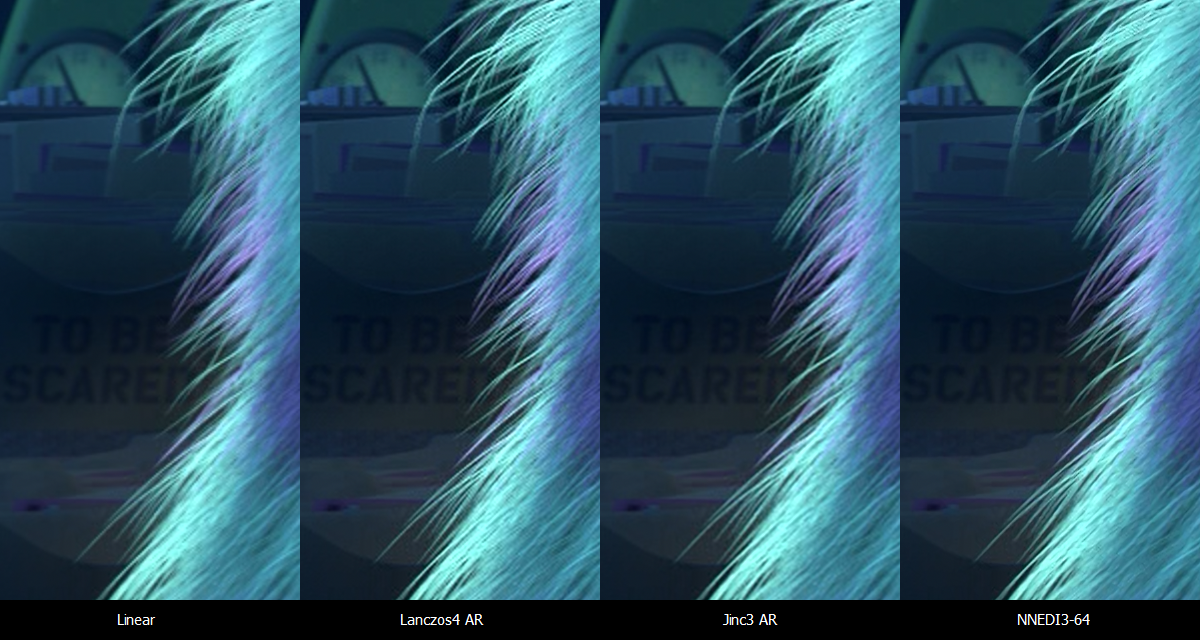
看顶部最长的那根毛,非常明显的说。
作者: eternal0    时间: 2014-1-26 19:17
chitaotao 发表于 2014-1-26 16:09
NV最少可以用opencl ,这个早就支持的

OpenCL的实现都是各自为政的,目前N卡跑这个NNEDI3算法就是黑屏。
作者: cenxuebin    时间: 2014-1-26 22:09
chitaotao 发表于 2014-1-26 16:09
NV最少可以用opencl ,这个早就支持的

你可以试一下

反正我的660不行

260X一点就可以了
作者: eraser666    时间: 2014-1-27 13:35
所以我不是说了么,madVR上面AMD这次算是翻身了

这软件曾经只有N卡跑得顺
作者: q12345    时间: 2014-1-28 00:37
900度近视,眼瞎也能看出4个算法的不同
这图点一下还有大图的
区别真的很明显
作者: 明镜止水    时间: 2014-1-28 00:39
a9988a 发表于 2014-1-26 16:31
我眼睛瞎了。。。。。。
看不出来啊

该换眼镜了
作者: ambacl    时间: 2014-1-28 08:46
本帖最后由 ambacl 于 2014-1-28 09:23 编辑

看来madshi是换了张A卡了,不过从0.87.4来看,似乎对N卡有改进?
workaround added: NNEDI3 upscaling failed/froze with newer NVidia GPUs
0.87.1,N卡开那个新的渲染视频会黑掉的,我试过

作者: 深谷白云    时间: 2014-1-28 11:23
ambacl 发表于 2014-1-28 08:46
看来madshi是换了张A卡了,不过从0.87.4来看,似乎对N卡有改进?
workaround added: NNEDI3 upscaling fai ...

0.87.4有很大的改善,没黑掉,不过整个画面变成绿的,就像用夜视仪那样
作者: eternal0    时间: 2014-1-28 14:44
深谷白云 发表于 2014-1-28 11:23
0.87.4有很大的改善,没黑掉,不过整个画面变成绿的,就像用夜视仪那样

貌似是开了之后对应的通道就变成全0了。
如果只对Luma开启NNEDI3,就是黑+暗红+深蓝,对Chroma开启就是绿色,同时对Luma和Chroma开启就是黑屏了。
作者: cenxuebin    时间: 2014-1-28 15:22
eternal0 发表于 2014-1-28 14:44
貌似是开了之后对应的通道就变成全0了。
如果只对Luma开启NNEDI3,就是黑+暗红+深蓝,对Chroma开启就是绿 ...

我四个全开也是黑。。。

660+332.21驱动
作者: kaka5504    时间: 2014-1-28 15:47
开NNEDI3放1080i卡爆。。。
作者: Chris    时间: 2014-1-28 23:00
新版已经修正了n卡的问题

不过我是firepro
作者: cenxuebin    时间: 2014-1-28 23:30
Chris 发表于 2014-1-28 23:00
新版已经修正了n卡的问题

不过我是firepro

我的660还是一样,不是黑屏就是绿屏

用n卡能正常播放的请上一下设置图吧
作者: doaboy    时间: 2014-1-29 17:17
cenxuebin 发表于 2014-1-28 23:30
我的660还是一样,不是黑屏就是绿屏

用n卡能正常播放的请上一下设置图吧

官网说了,必须327.23及以下驱动也可以,新版驱动有bug,换了327.23驱动,正常了,同样N卡660
作者: cenxuebin    时间: 2014-1-30 12:07
doaboy 发表于 2014-1-29 17:17
官网说了,必须327.23及以下驱动也可以,新版驱动有bug,换了327.23驱动,正常了,同样N卡660

还是不行。。换了几个327.23以下的驱动了

你是怎么设置的,能上下图么?
作者: doaboy    时间: 2014-2-8 15:17
cenxuebin 发表于 2014-1-30 12:07
还是不行。。换了几个327.23以下的驱动了

你是怎么设置的,能上下图么?

就用327.23版驱动,然后直接可以使用,设置也就是速度的差异。
作者: 我说的是事实    时间: 2014-2-17 19:00
NNEDI3 NB在不是单纯的采样算法,会对画面中检测出的锯齿进行填充


欢迎光临 POPPUR爱换 (https://we.poppur.com/) Powered by Discuz! X3.4